An agent that works on your devices and asks before it acts
Quilt has one agent, called Q, and three places to find it: Q, Inbox and Calendar. This page shows what each place does, how Q thinks a request through, and where your data goes, with the rules that keep it private built into the app. Every picture is a real screen with made-up people and messages.
Three places, one Q
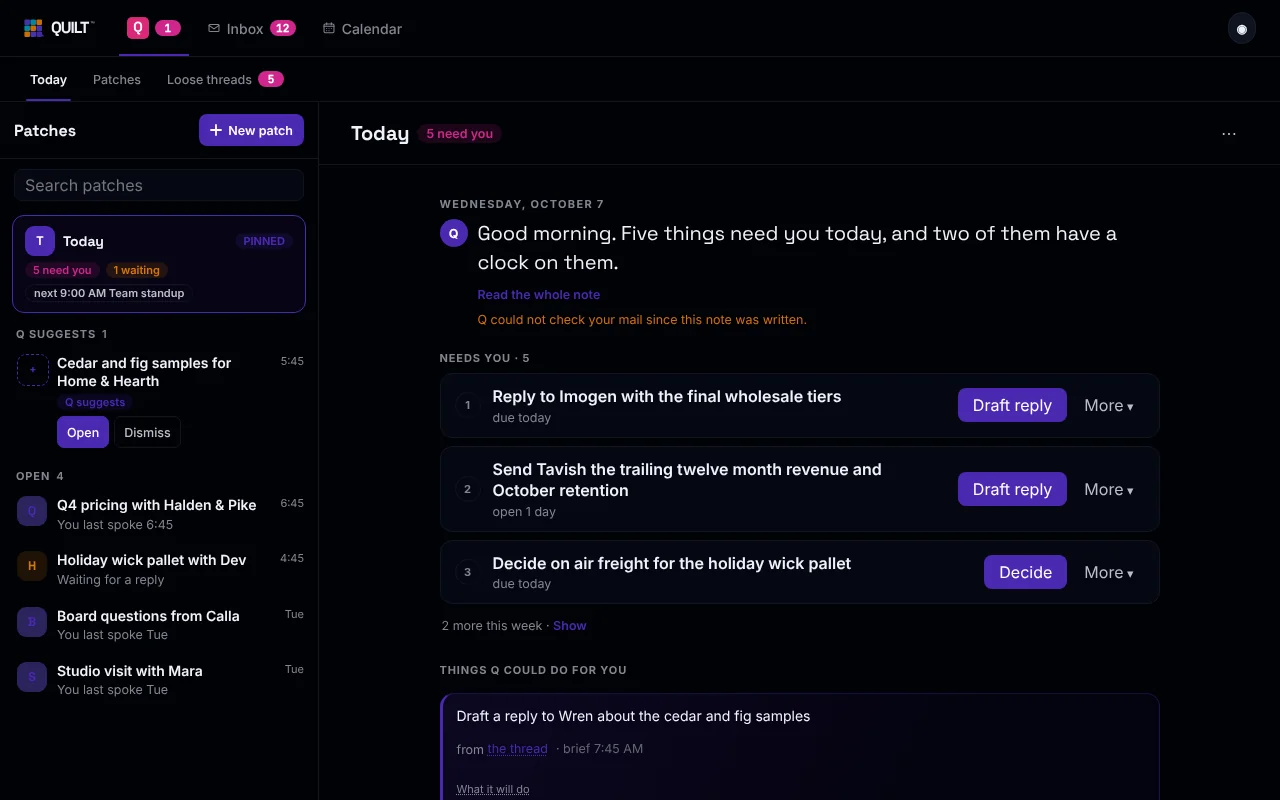
Today, Patches and Loose threads
Q opens on Today: a short note, the things that need you as cards, and what Q could do for you.
Next to it, Patches holds one conversation with Q about one thing, such as a deal or a trip. Q can suggest a patch, and it stays a suggestion until you open it. Loose threads is your to-do list: what you owe, what you are waiting on, and what needs sorting out.
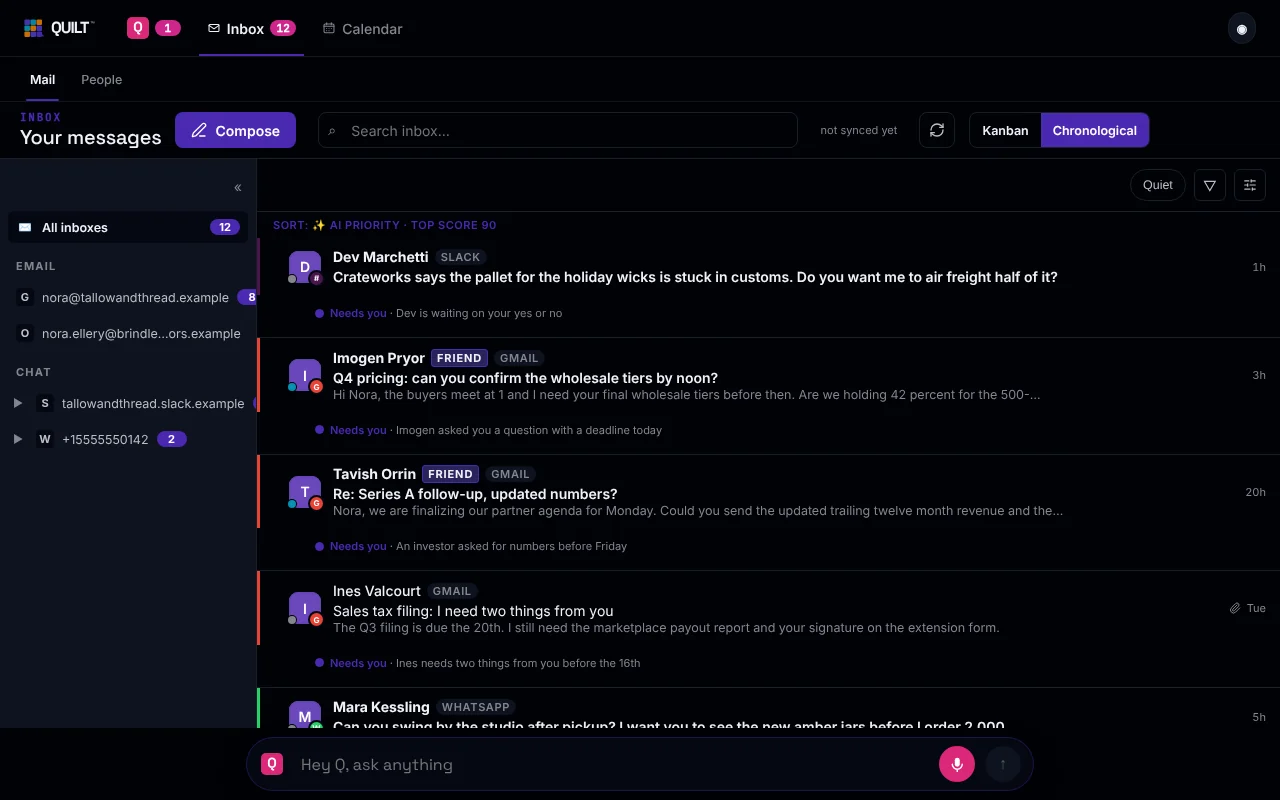
Your accounts in one list
Mail from Gmail and Outlook, plus Slack and WhatsApp chats, in one list. Each message that needs you says why in a few plain words. People lists the people you talk to.
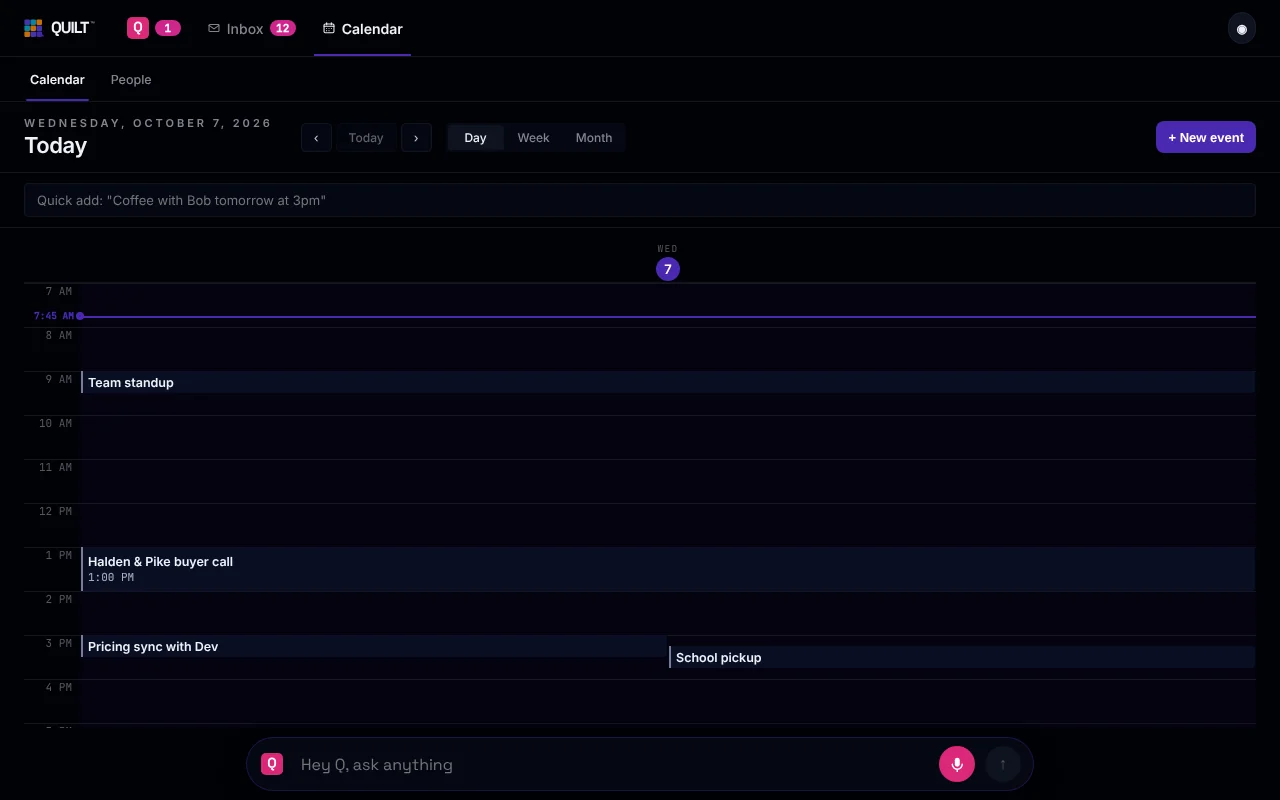
Your day, and what is behind each meeting
Day, week and month views, and a quick-add box that understands a sentence like "Coffee with Bob tomorrow at 3pm". Open a meeting to see the prep Q wrote, and after the call, your meeting notes.
Hey Q, the box at the bottom, is on all three. Ask from the screen you are on, and the answer appears there.
Cloud models plan. Quilt acts.
When you ask Q for something, a model in the cloud can help think it through. The model only suggests steps. Your device does the work, and you say yes.
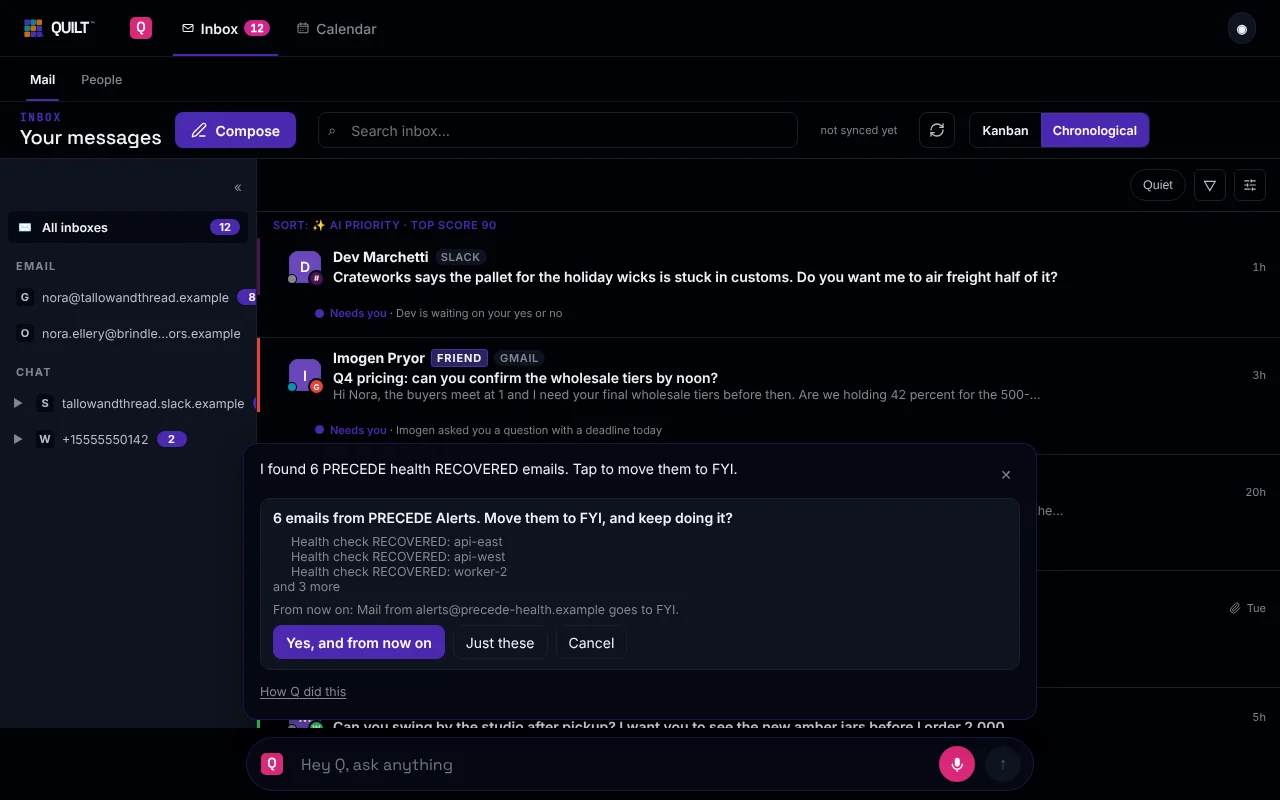
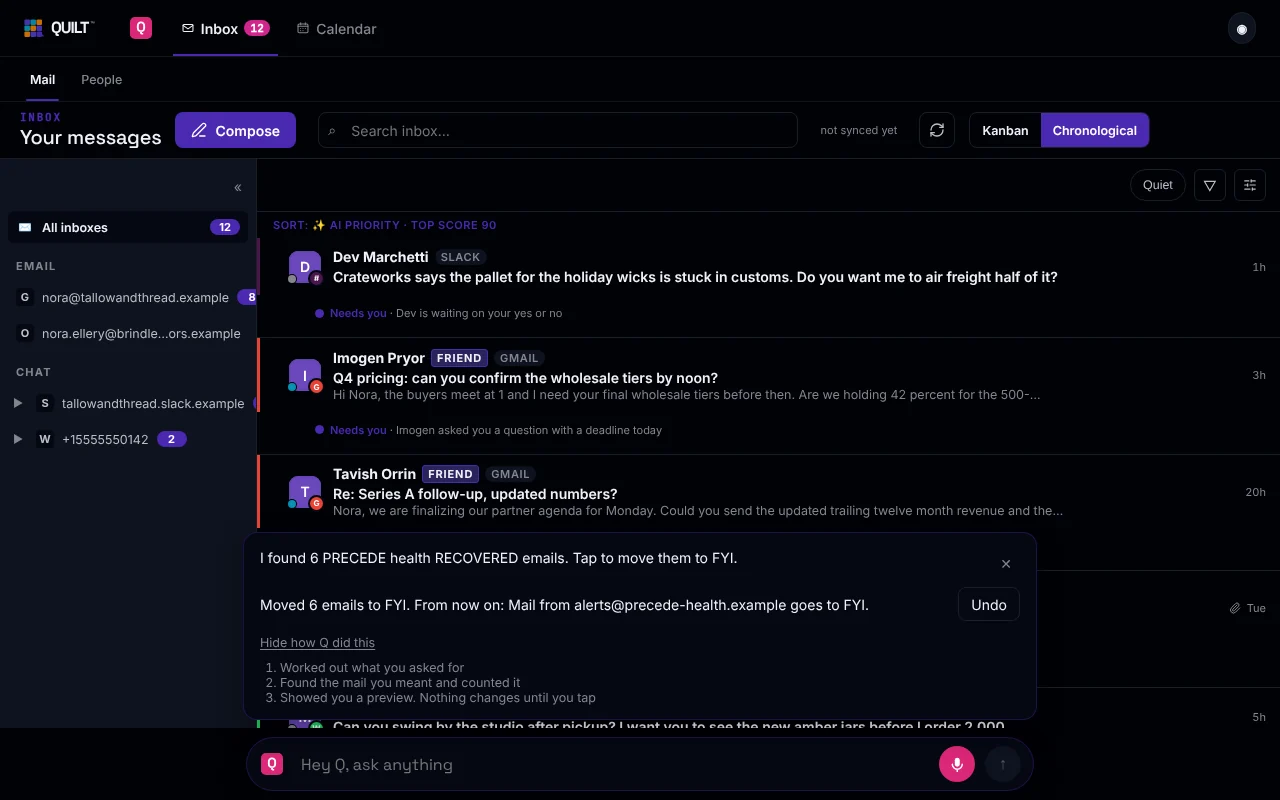
- Q can draft and propose. It cannot send, pay, post or delete. There is no such tool for the model to call. A drafted reply opens in a window for you to edit and send.
- Reading and searching happen on your device. The model can see what Q reads for that request, which is why the privacy page lists what goes along with it.
- One switch turns off all cloud help, including Hey Q. It is called Privacy Max on Windows, where it is shown as On this computer, and On this device only on iPhone. Nothing goes to any AI service while it is on.
- Q in the background, which looks for things worth your attention while you are away, is off until you turn it on. It can only read.
Built in, not just promised
A privacy policy is a promise. These rules are part of how Quilt is built, so the app keeps them even if you never read a policy. Here is how each one works.
- Email text never goes to Quilt's own AI. Every AI call is checked on your device before it is sent. A call that could carry your mail is refused if it would go to Quilt's own AI account, and a new kind of call counts as carrying mail until we decide otherwise. Features that read your mail use your own Claude key, or stay off.
- Your data lives on your devices. Your calendar, meeting notes, Q's memory and the index of your mail are stored in a database on your devices.
- Sync is end-to-end encrypted. Your device locks each piece of data before it uploads it. Quilt's servers store it and pass it to your other devices. They see sizes and timing, not content. The privacy page lists the few things our servers can read.
- Cloud models plan. They never act. The model is given no tool to send, pay, post or delete. Quilt does the steps on your device, shows a preview, and waits for your tap.
- The switch fails safe. If the app cannot read the On this device only switch, it counts as on. A phone follows the stricter of its own setting and your computer's.
- Quilt never trains on your data.
We have not had Quilt independently audited, and we will say so when that changes.
Q's memory stays on your computer
Q remembers things you tell it, like which supplier you trust or that Sam is vegetarian. It uses them in later requests, so you explain less each time.
- The memory is stored on your computer and is never synced to our servers.
- In Settings, under Q's brain, What Q remembers lists every fact with where it came from and when.
- A fact you told Q is kept straight away. A fact Q picked up from a message is marked as not confirmed until you tap Confirm.
- You can make Q forget any fact. Forgotten facts no longer reach any request.
When a fact is relevant to your request, it goes along with that request to the model, like any other context. The memory is private to your devices. It is not hidden from the model that is helping you.
Notes without a bot on the call
- Q listens on your computer. Nothing joins the call.
- Before each meeting it asks: yes and tell them, not this call, or always for this series. Nothing is captured before a yes.
- The words are turned into text on your computer. The first time, Q downloads a speech model for that.
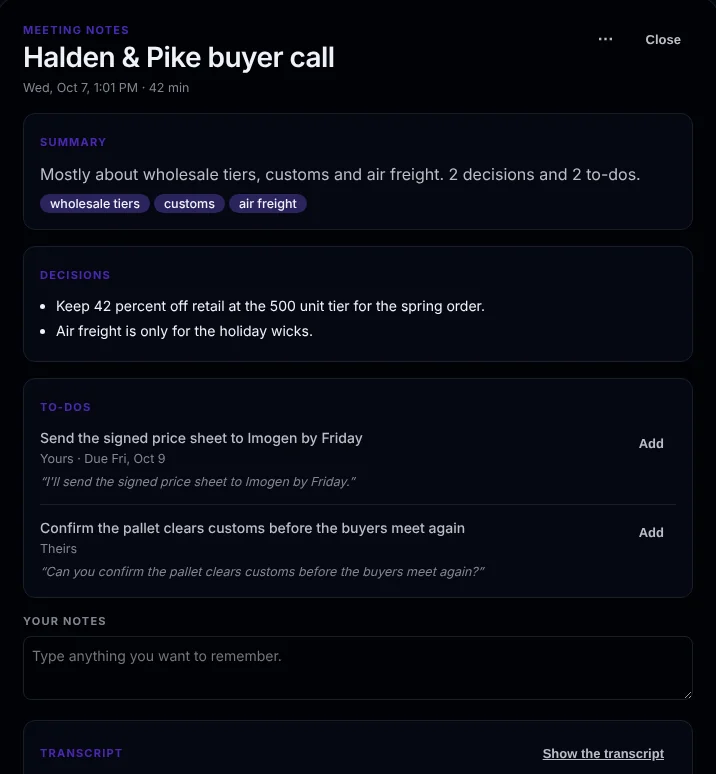
- After the call you get a summary, the decisions, and the to-dos, each with the line it came from. A to-do goes on your list only when you tap Add.
- Audio is deleted once the text is saved, unless you choose to keep it.
Telling the people on the call is up to you. Q gives you a line to paste. On iPhone there is only an on and off switch for each meeting so far.
What you need today
Quilt is in an early, invite-only stage. We would rather tell you the edges now.
- A Windows computer. That is the main app. An iPhone app is also available by invitation, and it works best paired with your computer.
- A Gmail or Outlook account. Slack and WhatsApp can be added.
- During the alpha, bring your own Claude key. Add it in Settings, and requests go from your device straight to Anthropic, the company that makes Claude.
- There is no Mac, Android or web app yet.